
What Goes Into an AI Cricket Signal: The Data Explained

Summary
An AI cricket signal is a model-generated read on a live match, such as a projected score, an over outlook, a session forecast or a ranking of in-form players. This guide is an AI cricket signal explained from the inside: the data that feeds a signal, how that data becomes a number on screen, what the confidence bar and timestamp mean, and where the limits are. It draws on what AllCric shows in its AI Signals tab and on what the company has said publicly about its data sources. In short, signals combine live match data with historical, player, venue and conditions data, and each signal in the app states what it is based on. The exact model and weightings are not public, so this article keeps to what can be verified.
Understanding the Data Behind AI Signals
When a card on your screen says a team is projected to finish on 262, it is easy to treat the figure as magic. It is not. Every signal is the end of a chain: data goes in, a model processes it, and a number comes out with a label, a confidence level and a timestamp.
Understanding that chain makes you a better reader of signals. You know what a number can tell you, what it cannot, and when to trust it a little less.
This guide explains what goes into a signal using AllCric, a live cricket score, prediction and fantasy app, as the reference. It separates three things: what the app visibly shows, what AllCric has said publicly, and what remains undisclosed.
What Is an AI Cricket Signal?
So, what is an AI cricket signal? It is a forward-looking output from a model that reads live and historical cricket data and turns it into something you can act on while the match is still going.
Three qualities define it:
- It is predictive, not just descriptive. A scorecard says what has happened. A signal estimates what may happen.
- It updates as the match moves. Signals are refreshed during play and carry an update time.
- It is probabilistic. A signal expresses likelihood and confidence, not certainty.
In AllCric, signals appear in the AI Signals tab, which sits alongside the Info, Live, Scorecard, Commentary and Fantasy tabs. AllCric groups its live outputs under the name AI Markets: AI Win Probability, Predicted Score Range, Over Prediction, Session Prediction and Top Player Impact.
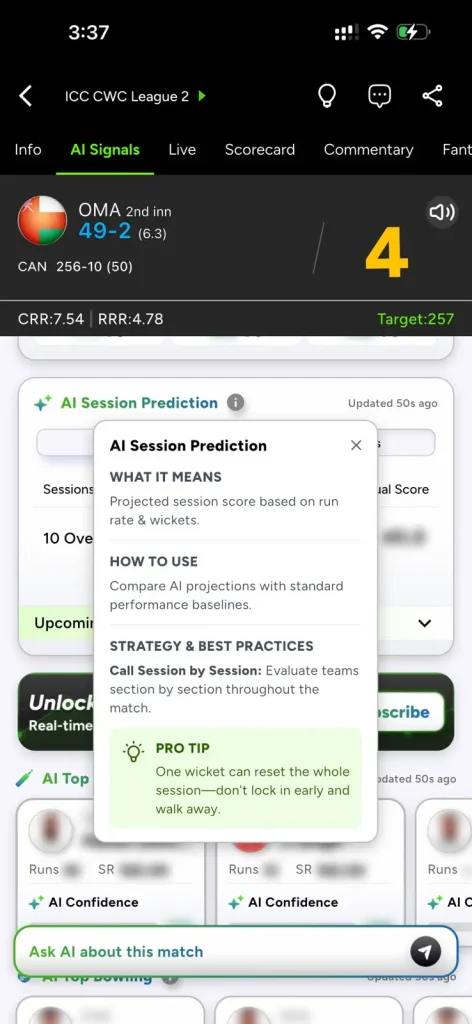
The Anatomy of a Signal on the Allcric App
Every signal in the AI Signals tab follows a similar structure. Knowing the parts helps you read any card quickly.
|
Part |
What it is |
Why it matters |
|
Label |
The signal name, such as AI Predicted Score or AI Over Prediction |
Tells you what question the signal answers |
|
Output |
The projection, line or ranking itself |
The headline read |
|
Confidence |
A percentage or bar showing how strongly the model leans |
Helps you judge how much weight to give the read |
|
Update time |
A note such as “Updated 50s ago” |
Tells you how fresh the read is |
|
Info panel |
A tooltip explaining what it means, how to use it, strategy tips and a pro tip |
Gives you the intended reading of the signal |
The info panel is easy to overlook. Each one follows a fixed pattern of “What it means,” “How to use,” “Strategy and best practices” and a “Pro tip,” which makes the logic of each signal explicit.
Cricket Signal Data: The Inputs
According to an October 2026 press release from AllCric, its AI draws on several data streams at the same time. Based on that description, the main categories of cricket signal data are:
- Historical match data. Results and scoring patterns from past matches, which give the model a baseline for how situations usually unfold.
- Player career statistics. Performance records across formats, which inform how individual players are likely to perform.
- Pitch and surface behaviour. How a surface tends to play, which affects how many runs are realistic and how bowlers fare.
- Venue-specific scoring patterns. What counts as a good score at a particular ground.
- Weather and atmospheric conditions. Factors that can change how the ball moves and how the match flows.
- Head-to-head matchup records. How specific batters and bowlers have fared against each other.
- Live in-match inputs. The current score, wickets, overs, run rates and recent events as the game unfolds.
The release also says AllCric’s models are cricket-specific, meaning built and calibrated on cricket data rather than adapted from general-purpose models. Because this was issued through a PR arrangement, it is best read as the company’s own description.
How AI Signals Work: From Data to Display
Here is the general path from data to a card on your screen. The steps describe how such systems typically operate, and the AllCric-specific inputs above fill in the first step.
- Collect. The system gathers live match data and pulls in historical, player, venue and conditions data.
- Prepare. The data is cleaned and organised into features, such as the current run rate, wickets in hand and recent form.
- Model. A machine learning model converts those features into an estimate, such as a projected score or a likelihood.
- Score confidence. The system attaches a measure of how strongly the model leans, which the app shows as a confidence figure or bar.
- Display. The result appears on the signal card with a label and an update time.
- Refresh. As new events arrive, the cycle repeats.
This is a general description. The specific model type, features and refresh logic used by AllCric are not publicly detailed.
Signal by Signal: What Each One Is Based On
The app’s own info panels state what each signal is based on. That is the most reliable source for how each card works, so we summarise them here.
|
Signal |
What it shows |
Stated basis in the app |
|
AI Predicted Score |
Projected innings score |
Run rate and wickets |
|
AI Over Prediction |
Likely over outcome, with an AI confidence percentage |
Form and pitch conditions |
|
AI Session Prediction |
Projected session score shown next to the actual score |
Run rate and wickets |
|
AI Top Player |
Top three batters and bowlers, with runs and strike rate or wickets and economy, plus a confidence bar |
Recent form |
Two patterns are worth noticing. First, team-level signals, the predicted score and session prediction, lean on run rate and wickets, which are the two core resources in any limited-overs innings. Second, the over prediction brings in form and pitch conditions, which adds context to a short, volatile window of play.
The info panels also give guidance on how to use each signal. For example, the predicted score guide suggests layering score lines across multiple thresholds, the over prediction guide suggests spreading analysis across overs, the session guide suggests evaluating the match section by section, and the top player guide notes that form beats fame.
Confidence Scores: What the Bar Tells You
Several signals carry a confidence indicator: the over prediction shows a percentage, and each player card in AI Top Player has an AI confidence bar. The in-app guidance says to check confidence scores to see how strongly the signal favours a call.
How to read it well:
- Confidence is a lean, not a guarantee. A high figure means a stronger lean, not a certain outcome.
- Compare within the module. Look at confidence relative to the other items in the same card or list.
- Pair it with the output. A high-confidence read on a minor player matters less than a moderate read on a key one.
- Use it to break ties. When two options look equal, the stronger lean can tip the decision.
Freshness: Why the Update Time Matters
Every signal module in the app shows when it was last updated. In the screenshots we reviewed, timestamps read in the range of tens of seconds, such as 36, 43, 50 and 59 seconds ago.
That detail matters because cricket can change quickly. A wicket, a six or a change of bowler can shift the picture within a single over. If a card is a minute old and a lot has happened, the read may lag. Make a habit of checking the timestamp before acting on a signal, and refresh your view after key events.
A Worked Example From a Live Match
Here is how the pieces fit together in an ICC CWC League 2 match shown in the AI Signals tab. Canada made 256 in 50 overs. Oman, chasing 257, were 49 for 2 after 6.3 overs, with a current run rate of 7.54 and a required run rate of 4.78.
- Live inputs: target 257, 208 runs still needed, 43.3 overs left, two wickets down.
- Run-rate picture: the current rate is well above the required rate.
- Team-level signal: the AI Predicted Score card showed a projection of 262.0 runs, slightly above the target.
- Session view: the Session Prediction card showed a 10-over block with the AI predicted score set next to the actual score.
- Over view: the Over Prediction card showed lines such as Over 4.5 with an AI confidence percentage.
Taken together, the live inputs and the signals pointed the same way, which is exactly what a reader should look for. When they disagree, that is the moment to dig deeper, perhaps by asking a question in the Ask AI bar.
How to Judge Signal Quality as a Fantasy Player
You do not need the model’s internals to read a signal sensibly. A few habits go a long way.
- Read the info panel. It tells you what the signal is meant to show.
- Check the timestamp. Fresh reads beat stale ones.
- Check confidence. Treat high and low confidence differently.
- Cross-check across signals. Agreement across modules strengthens a read, and disagreement is a prompt to look closer.
- Compare with the scoreboard. Make sure the signal fits the match state.
- Watch trends. A single irregular over rarely breaks a pattern.
- Ask a follow-up. Use the Ask AI bar to clarify anything surprising.
Final Thoughts: Read the Inputs, Trust the Output Wisely
The clearest way to think about an AI cricket signal explained is as a chain: live data and background data go in, a cricket-specific model processes them, and a labelled output comes out with a confidence level and a timestamp. AllCric tells you what each signal is based on, and its published materials describe the families of data behind them. What it has not shared is the fine detail of the model.
That is enough to read signals sensibly. Check the label, read the info panel, look at the confidence and timestamp, compare with the scoreboard and cross-check across modules. Do that, and a number on a screen becomes what it should be: a well-understood input to your own view of the match.
FAQS
It is a model-generated read on a live match, such as a projected score, an over or session outlook, or a ranking of in-form players.
Its published materials list historical match data, player career statistics, pitch and surface behaviour, venue scoring patterns, weather conditions, head-to-head records and live in-match inputs.
In general, data is collected and prepared, a model turns it into an estimate, a confidence measure is attached, and the result is displayed and refreshed as the match moves.
It shows how strongly the model leans toward a call. It is not a guarantee.
Each module shows an update time. In the screenshots we reviewed, it read in the range of tens of seconds.