
AI Cricket Signals and Ask AI: Live Match Reads Before Every Ball
A cricket match can change in just one over, and AI signals help you see those changes faster. From predicted scores and live match reads to top-player form and Ask AI, these tools help you understand what may happen next and why.
Summary
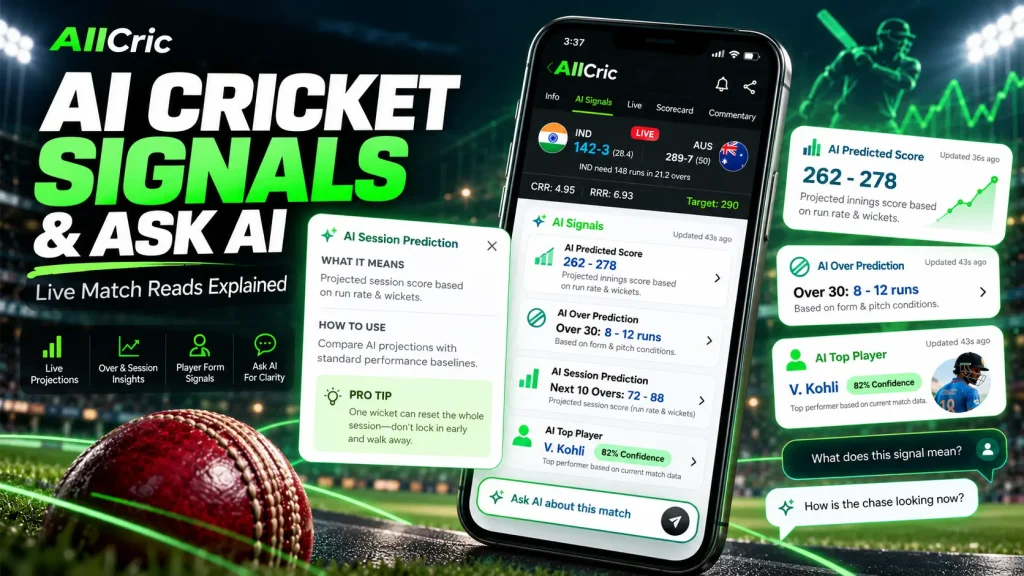
AI cricket signals turn live match data into forecasts you can read in seconds: a projected innings score, an over-by-over outlook, session projections and a ranking of the form players. AllCric brings these together in its AI Signals tab, and pairs them with Ask AI, a chat assistant that answers questions about the match you are watching. This guide explains what each signal means, how to use it, how Ask AI fits in, where the limits are, and how fantasy players can put it all to work. The core message: AI signals are a decision aid, not a crystal ball. Used well, they help you see momentum shifts a ball or two before the scoreboard does.
Introduction
Every cricket fan knows the feeling. A team is 49 for 2 after 6.3 overs, chasing 257, and the room splits into two camps: those who say the chase is on, and those who say one wicket changes everything. Both are partly right. The question is how much.
That gap between instinct and evidence is where AI cricket signals come in. Instead of relying only on gut feel or a glance at the required run rate, a signal blends live match data with historical patterns to say something specific: where the innings may finish, how the next over could go, which players are in form.
AllCric, a live cricket score, prediction and fantasy app, describes itself as an AI-first cricket insights platform built to keep fans “one ball ahead.” Its AI Signals tab and its Ask AI assistant are the two features at the centre of that promise. This article walks through both, based on how the features appear in the app and on AllCric’s published descriptions.
What Are AI Cricket Signals?
An AI cricket signal is a model-generated read on a live match. It takes inputs such as the current score, wickets lost, overs bowled, run rate and recent player form, and produces a projection or a ranking that updates as the game moves.
A few things separate a signal from a plain statistic:
- It looks forward. A scorecard tells you what has happened. A signal estimates what may happen next.
- It updates continuously. Each module in AllCric carries an “Updated” timestamp, so you can see how fresh the read is.
- It comes with context. Every signal has an info panel explaining what it means, how to use it, strategy tips and a pro tip.
- It is probabilistic. A signal expresses likelihood, not certainty. Cricket’s unpredictability is the reason the sport is loved, and no model removes it.
AllCric’s own materials group these live outputs under the name AI Markets, covering AI Win Probability, Predicted Score Range, Over Prediction, Session Prediction and Top Player Impact. In the app’s AI Signals tab, you will see them presented as cards you can scroll through during a match.
A Tour of the AllCric AI Signals Tab
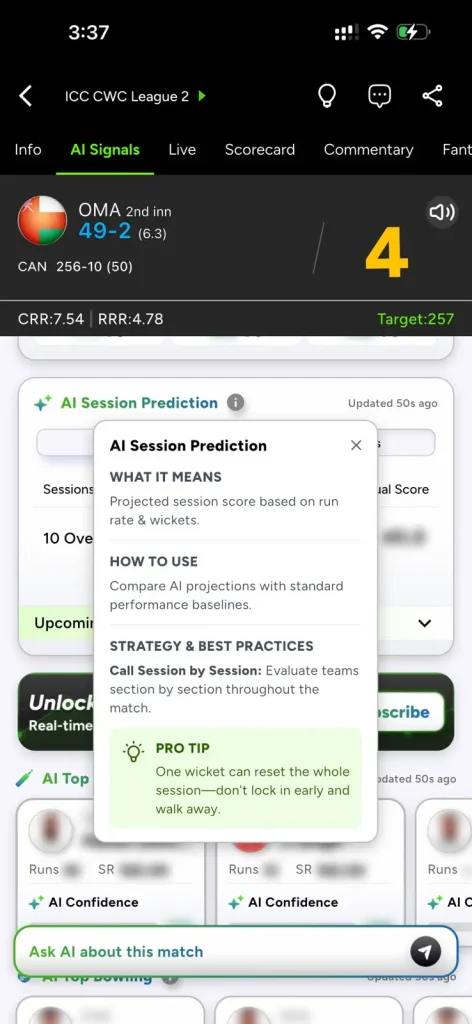
Open any match in AllCric and you will find a row of tabs: Info, AI Signals, Live, Scorecard, Commentary and Fantasy. The match header stays pinned at the top, showing the batting team, score, overs, the current run rate (CRR), the required run rate (RRR) and the target. That means you can scroll through signals without losing sight of the game state.
Below the header, the AI Signals tab is organised as a stack of modules. Each has a small information icon that opens a short guide. The table below summarises what you will see.
|
Signal |
What it shows |
How the app says to use it |
|
AI Predicted Score |
Projected innings score based on run rate and wickets |
Compare AI forecasts with performance baselines and look across several scoring thresholds |
|
AI Over Prediction |
Likely over outcome based on form and pitch conditions, with an AI confidence percentage |
Check confidence to see how strongly the model favours a call, and spread analysis across overs |
|
AI Session Prediction |
Projected session score (for example, a block of 10 overs) shown against the actual score |
Compare projections with standard baselines and evaluate the match section by section |
|
AI Top Player |
Top three batters and bowlers by recent form, each with an AI confidence bar |
Check confidence scores and treat top picks as potential fantasy captains |
Across the tab, a persistent Ask AI about this match bar sits at the bottom of the screen, so the assistant is always one tap away.
AI Predicted Score
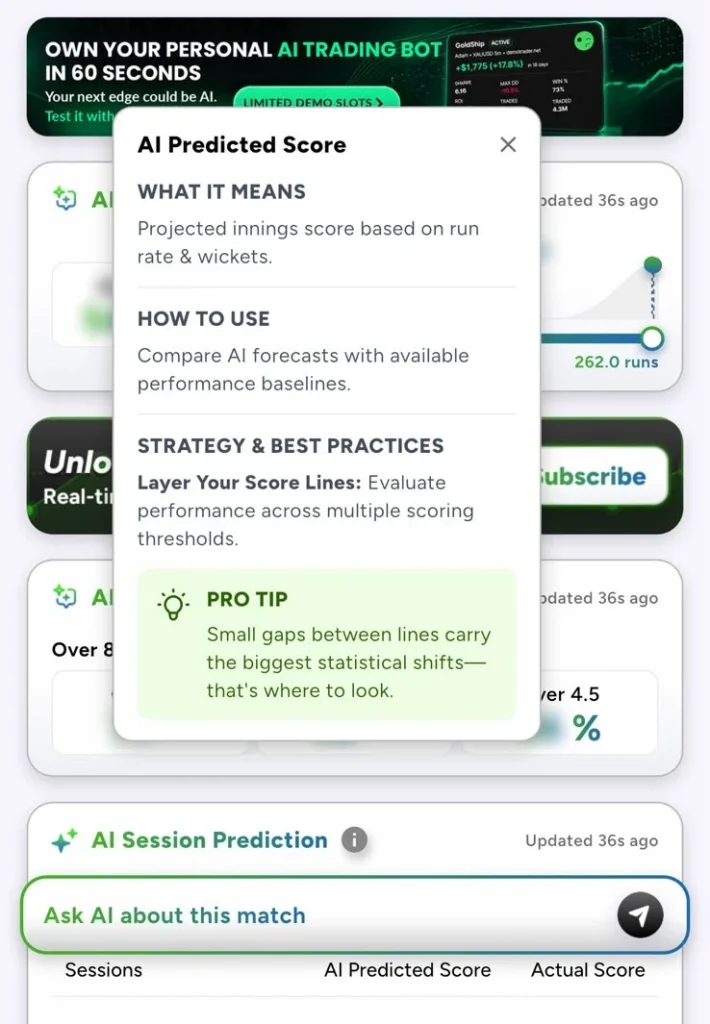
The AI Predicted Score is the headline forecast. According to the in-app guide, it is a projected innings score based on run rate and wickets. In the example match we reviewed, the card showed a projection of 262.0 runs on a slider-style display, alongside the live target of 257.
Why it matters:
- It reframes the target. Knowing the required rate is useful. Knowing whether the model sees the chasing side finishing above or below the target is more useful.
- It supports score-line thinking. The app’s strategy tip is to layer your score lines, meaning you evaluate performance across multiple thresholds rather than a single number.
- It highlights small gaps. The pro tip points out that small gaps between lines carry the biggest statistical shifts, so those close calls deserve your attention.
A practical habit: note the predicted score when you first open the tab, then check it again after each wicket or big over. The way it moves tells you how the model is reading momentum.
AI Over Prediction
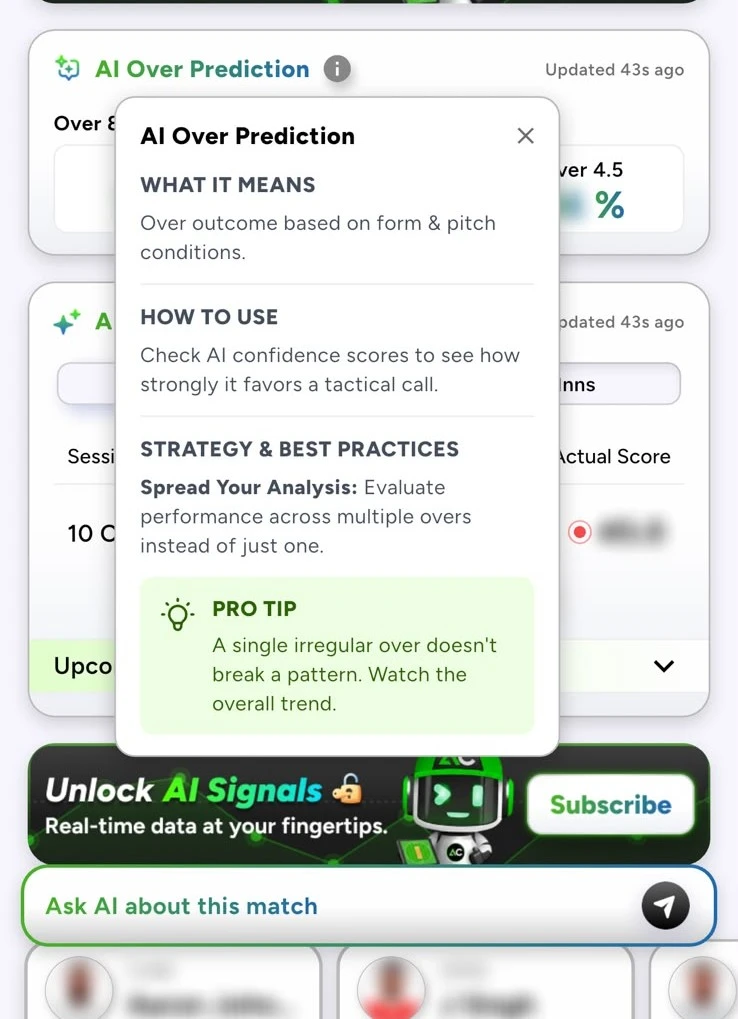
Over-level cricket is where matches turn quickly. AI Over Prediction offers an over outcome read based on form and pitch conditions. The card presents lines such as an over total threshold (for example, Over 4.5) along with an AI confidence percentage.
The key concept is confidence. The app’s guidance is to check confidence scores to see how strongly the model favours a tactical call. A high-confidence read and a marginal one are not the same thing, and treating them equally defeats the purpose.
The in-app strategy advice is refreshingly sensible: spread your analysis across multiple overs instead of judging a single one. The pro tip adds that a single irregular over does not break a pattern, so watch the overall trend. If a bowler concedes 14 in one over against the model’s expectation, that is a data point, not a verdict.
AI Session Prediction
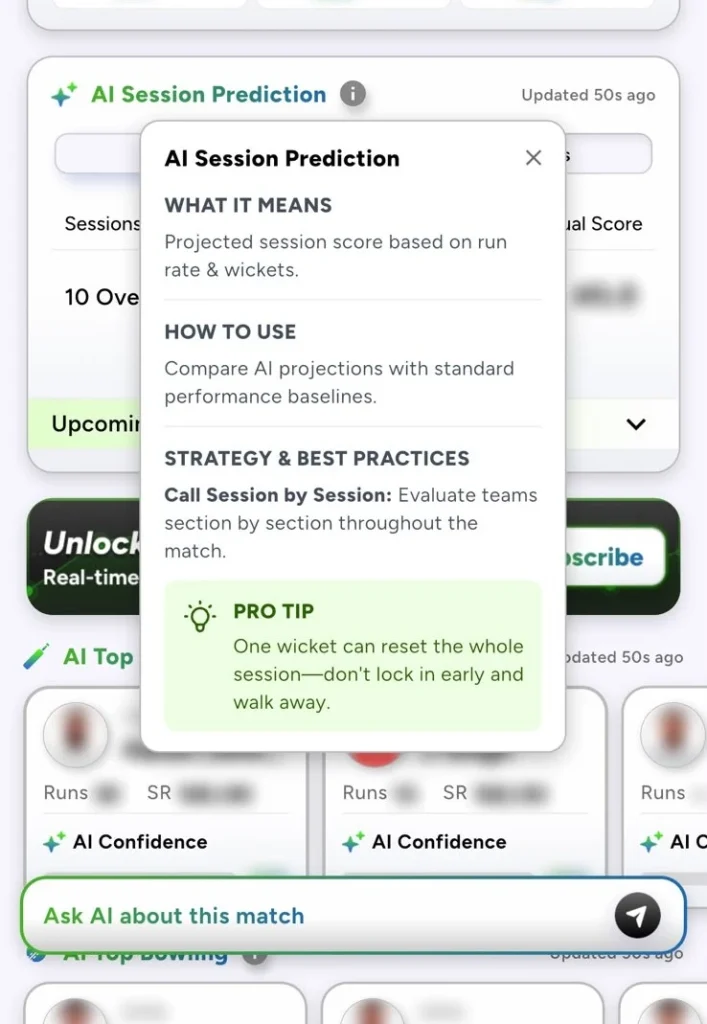
Sessions give a broader frame than overs. The AI Session Prediction card shows a projected session score based on run rate and wickets. It lays out the session (such as a 10-over block), the AI Predicted Score and the Actual Score side by side, with an upcoming-session section you can expand.
This side-by-side layout is useful for two reasons:
- You can audit the model in real time. If the actual score tracks the projection, the read is holding up. If it drifts, something has changed.
- It encourages session thinking. The app’s advice is to evaluate teams section by section throughout the match, such as powerplay, middle overs and death overs in limited-overs cricket.
The pro tip is a good reminder of cricket’s volatility: one wicket can reset the whole session, so do not lock in a view early and walk away.
AI Top Player
The AI Top Player module ranks the top three batters and top three bowlers based on recent form. Each player card shows core numbers and an AI confidence bar:
- Batters: runs and strike rate
- Bowlers: wickets and economy rate
The in-app explanation is that you should check confidence scores for each player to optimise tactical line-ups. Its strategy tip is to use top picks as potential captains when building a fantasy team, and its pro tip is the one every analyst repeats: form beats fame. A quiet player in good form can outscore a big name having an off day.
How to Read AI Predicted Score and Live Win Probability
The AI Predicted Score is the headline forecast. According to the in-app guide, it is a projected innings score based on run rate and wickets. In the example match we reviewed, the card showed a projection of 262.0 runs on a slider-style display, alongside the live target of 257.
Why it matters:
- It reframes the target. Knowing the required rate is useful. Knowing whether the model sees the chasing side finishing above or below the target is more useful.
- It supports score-line thinking. The app’s strategy tip is to layer your score lines, meaning you evaluate performance across multiple thresholds rather than a single number.
- It highlights small gaps. The pro tip points out that small gaps between lines carry the biggest statistical shifts, so those close calls deserve your attention.
A practical habit: note the predicted score when you first open the tab, then check it again after each wicket or big over. The way it moves tells you how the model is reading momentum.
AllCric’s AI Markets also list AI Win Probability. The same habit applies: read it alongside the live score and refresh your view after each wicket or big over.
Ask AI Explained: Your Cricket AI Assistant for Any Match Question
Signals tell you what the model sees. Ask AI lets you ask what you want to know. It is a natural-language assistant, so you type a question in plain English, and the app returns an answer grounded in the match you are viewing. AllCric’s App Store description calls it an intelligent match companion that gives instant, context-aware answers to match-specific questions. Earlier release notes labelled it an AI chatbot in beta, and later updates mention an optimised chatbot experience.
What makes it useful is context. A generic chatbot does not know the score, the pitch or who is bowling. A match-aware cricket AI assistant starts from the live situation, which makes short, casual questions workable.
Examples of questions that suit it:
- “What is the required run rate now, and how does it compare with the current rate?”
- “Who are the in-form batters in this match?”
- “How might the next session go for the chasing team?”
- “Which bowler should I back as a fantasy pick today?”
- “Explain what a high AI confidence score means.”
It also works as a learning tool. Newer fans can ask what a term means or why a team is favoured, without leaving the match screen.
How to Read AI Match Reads Step by Step
Here is a simple routine for turning signals into AI match reads you can act on.
- Start with the game state. Check the header: score, overs, CRR, RRR and target. This is your ground truth.
- Open AI Predicted Score. Compare the projection with the target or your baseline expectation for the venue.
- Check Over and Session cards. Look at confidence levels and compare the AI projection against the actual score where shown.
- Scan AI Top Player. See who is in form and whether the ranking matches what you are watching.
- Ask a follow-up. Use Ask AI to clarify anything that looks surprising, such as why a projection jumped.
- Revisit after key events. A wicket, a big over or a change of bowler is the moment to refresh your read.
The point is not to follow the signals blindly. It is to add one more informed voice to your own reading of the game.
Using AI Signals for Fantasy Cricket
AllCric is also a fantasy companion, and the signals feed naturally into team decisions. The app offers an AI Create Team feature that builds an optimised fantasy team, and the AI Top Player module doubles as a shortlist for captain and vice-captain.
A few ways fantasy players can use signals:
- Captain shortlisting: use the top-ranked batters and bowlers as starting candidates, then weigh pitch, opposition and role.
- Form over reputation: the app’s own tip says a player in good form can outscore a bigger name.
- Live adjustments: in formats where you can follow the match closely, session and over reads help you gauge whether a batting side is likely to post a big total, which affects batter value.
- Confidence as a tie-breaker: when two players look equal, the higher confidence score can help you decide.
AllCric focuses on skill-based fantasy and describes its approach as insights and probabilities. No signal guarantees points, so treat these tools as support for your research, and play within limits you are comfortable with.
AI Signals vs Traditional Stats Apps: What Makes AllCric Different
|
Feature |
Traditional stats or score app |
AI signals in AllCric |
|
Core output |
What has happened (scores, averages, records) |
What may happen next (projections, confidence, form rankings) |
|
Updates |
Per ball or per over |
Continuously refreshed modules with visible update times |
|
Interpretation |
Left to the reader |
Built-in guides: what it means, how to use it, strategy and a pro tip |
|
Questions |
Search or browse |
Ask AI in plain language about the current match |
|
Fantasy support |
Stats tables |
Top-player rankings and AI team creation |
How to Use AI Signals to Pick Your Fantasy Captain and Build a Team
AllCric is also a fantasy companion, and the signals feed naturally into team decisions. The app offers an AI Create Team feature that builds an optimised fantasy team, and the AI Top Player module doubles as a shortlist for captain and vice-captain.
A few ways fantasy players can use signals:
- Captain shortlisting: use the top-ranked batters and bowlers as starting candidates, then weigh pitch, opposition and role.
- Form over reputation: the app’s own tip says a player in good form can outscore a bigger name.
- Live adjustments: in formats where you can follow the match closely, session and over reads help you gauge whether a batting side is likely to post a big total, which affects batter value.
- Confidence as a tie-breaker: when two players look equal, the higher confidence score can help you decide.
AllCric focuses on skill-based fantasy and describes its approach as insights and probabilities. No signal guarantees points, so treat these tools as support for your research, and play within limits you are comfortable with.
The Live Cricket Toolkit Around the Signals
AI Signals sit inside a fuller live cricket experience. According to AllCric’s App Store listing and release notes, the app also includes:
- Fast live scores and ball-by-ball commentary
- Improved CRR, RRR and target display during the toss and live play
- Smart alerts for toss, line-ups and milestones
- Venue and match intelligence
- Live match chat, fan polls and opinions so you can follow the game with other fans
- Cricket news and stats
This combination matters for live cricket AI. The signals are only useful if the underlying score data is fast and accurate, and the community features make the experience social rather than solitary.
AI Signals vs Traditional Stats Apps
|
Feature |
Traditional stats or score app |
AI signals in AllCric |
|
Core output |
What has happened (scores, averages, records) |
What may happen next (projections, confidence, form rankings) |
|
Updates |
Per ball or per over |
Continuously refreshed modules with visible update times |
|
Interpretation |
Left to the reader |
Built-in guides: what it means, how to use it, strategy and a pro tip |
|
Questions |
Search or browse |
Ask AI in plain language about the current match |
|
Fantasy support |
Stats tables |
Top-player rankings and AI team creation |
This is not a claim that stats apps are obsolete. Records and averages remain the foundation of good analysis. The difference is that AI signals add a forward-looking layer on top.
Limits to Keep in Mind
Trustworthy content should be honest about what a model cannot do. Keep these points in mind:
- Cricket is volatile. One wicket, one dropped catch or one change in conditions can shift a match.
- Signals are estimates. A confidence score reflects how strongly the model leans, not a guarantee.
- Data is only as fresh as its last update. Check the timestamp on each card.
- Context beats any single number. Weather, pitch behaviour and team news can matter more than a model captures.
- Use judgement. The app’s own tips repeatedly encourage looking at trends, thresholds and multiple overs rather than a single data point.
AllCric is free to download, with in-app purchases and subscription plans for advanced AI-powered insights and expert fantasy tools. In the app, some AI Signals data appears blurred behind a prompt to subscribe, which shows that full access is a premium feature. Exact plan details, pricing and any usage limits for Ask AI can change, so check the in-app subscription screen for the current offer.
Final Thoughts
The best way to think about AI cricket signals is as a second set of eyes. They do not replace the joy of watching a chase unfold ball by ball, and they will not tell you what a mistimed pull shot will do. What they can do is quantify the situation, flag momentum shifts and explain what the numbers imply.
Pair that with Ask AI, and you have a cricket AI assistant that meets you where you are, whether you are a fantasy player hunting a captain pick or a casual fan trying to understand why the required rate matters. Open the AI Signals tab in your next live match, check the timestamps, read the confidence, ask a question, and see how your own read compares. That is what staying one ball ahead looks like.
FAQS
They are live, model-generated reads on a match, such as projected scores, over and session outlooks, and top player rankings, designed to show where the game may be heading.
It is a natural-language assistant inside the app. You type a question about the match and get an instant, context-aware answer.
No. They are probabilistic estimates and should be combined with your own judgement.
Yes. Each module explains what it means and how to use it, and Ask AI can clarify terms and situations in plain language.
Yes. The AI Top Player module highlights in-form players and can inform captain choices, and AllCric also offers AI Create Team. Results are never guaranteed.
AllCric highlights coverage of major events such as IPL, ICC tournaments and international series, including the match shown in our example, ICC CWC League 2. Availability varies by match.